Get Started
Quickstart containers Understand the architecture
Migrate to Engine 1.10 Breaking changes Deprecated Engine Features FAQ
Release Notes
Learn about Dockerfiles and Docker Cloud Back up data volumes Create a proxy or load balancer Install the Deploy to Docker Cloud button Integrate with Slack Push images to Docker Cloud SSHing into a Docker Cloud-managed node Upgrade Docker Engine on a node Use the Docker Cloud Agent Using the Docker Cloud CLI
API reference
Quickstart contribution FAQ for contributors Where to chat or get help Style guide for Docker documentation

Autodestroy

Autodestroy is a Docker Cloud feature that when enabled on a service, will automatically terminate containers when they stop (destroying all data within the container). This is useful for one-off actions which store results in a external system. It can be set with the following values:

  • OFF: if the container stops, regardless of the exit code, Docker Cloud will not terminate it and will leave it in Stopped state.
  • ON_SUCCESS: if the container stops with an exit code equals to 0, Docker Cloud will automatically terminate it. Otherwise, it will leave it in Stopped state.
  • ALWAYS: if the container stops, regardless of the exit code, Docker Cloud will automatically terminate it.

If Autorestart is activated, Docker Cloud will evaluate whether to try restarting the container or not before evaluating Autodestroy.

Launching a Service with Autodestroy

Using the API

You can enable autodestroy when launching a service through the API:

POST /api/app/v1/service/ HTTP/1.1
{
	 "autodestroy": "ALWAYS",
	 [...]
}

If not provided, it will have a default value of OFF. Check our API documentation for more information.

Using the CLI

You can enable autodestroy when launching a service using the CLI:

$ docker-cloud service run --autodestroy ALWAYS [...]

If not provided, it will have a default value of OFF. Check our CLI documentation for more information.

Using the web interface

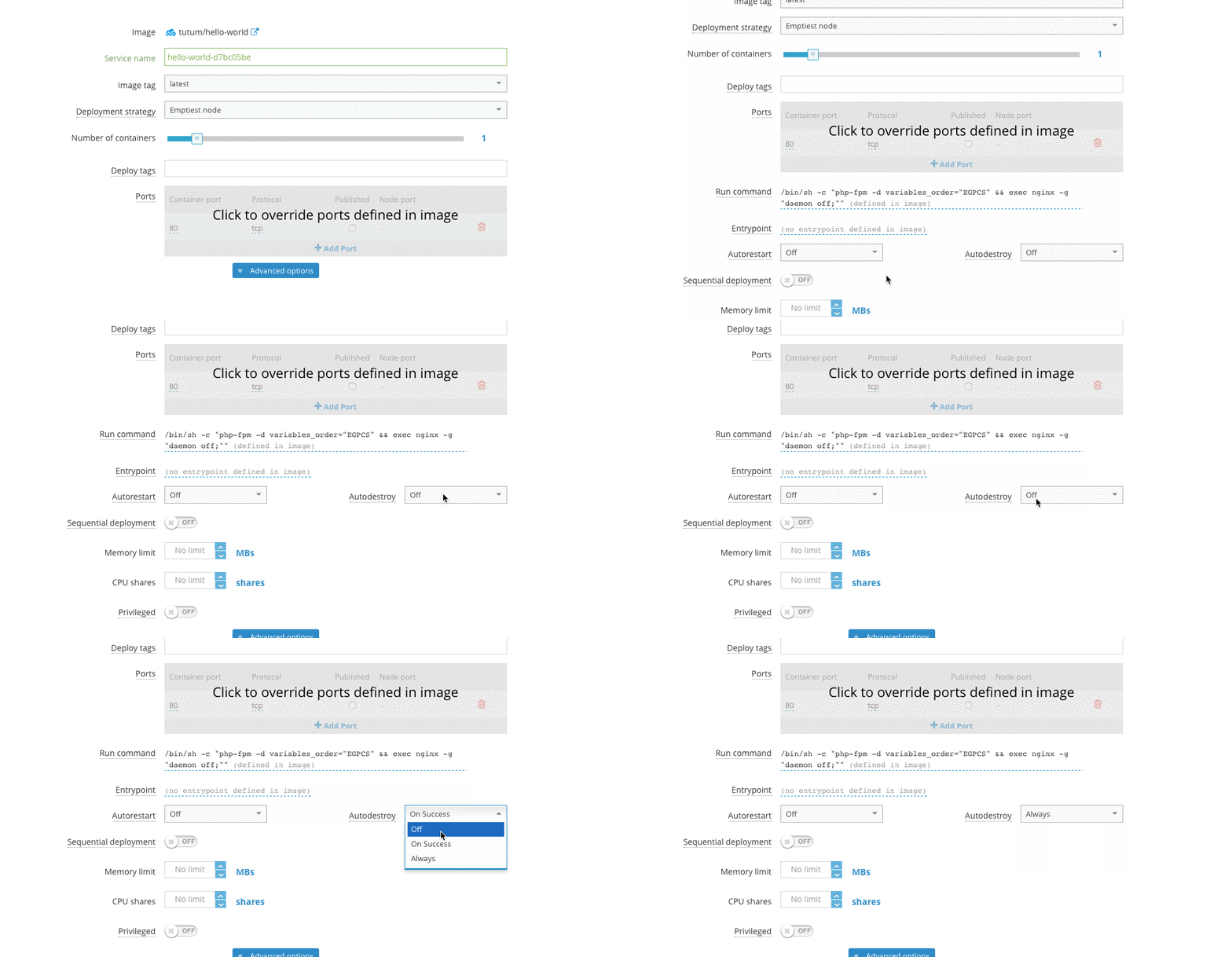
Activating the Autodestroy setting on the Service configuration step of the Launch new service wizard sets the autodestroy setting to ALWAYS.

The default value is to be *deactivated* which will set it to OFF.

Activating autodestroy to an already deployed service

Using the API

You can set the Autodestroy option after the service has been deployed through the API:

PATCH /api/app/v1/service/(uuid)/ HTTP/1.1
{
	"autodestroy": "ALWAYS"
}

Check our API documentation for more information.

Using the CLI

You can set the Autodestroy option after the service has been deployed using the CLI:

$ docker-cloud service set --autodestroy ALWAYS (name or uuid)

Check our API documentation for more information.

Using the web interface

You can also activate or deactivate the Autodestroy setting to a service after it has been deployed editing the service.

Mar 5, 2016 at 2:08am (PST) { "docker/apidocs": { "ref": "master", "repos": [ "git@github.com:docker/dhe-deploy.git" ], "sha": "70ac255c88cde0ea6ecf3fcb812783dea7e09da6" }, "docker/cloud-api-docs": { "ref": "master", "repos": [ "git@github.com:docker/cloud-docs.git" ], "sha": "c0539949c40be9abb193271e46d2ea88196f122d" }, "docker/cloud-api-docs-layout": { "ref": "master", "repos": [ "git@github.com:docker/cloud-docs.git" ], "sha": "c0539949c40be9abb193271e46d2ea88196f122d" }, "docker/compose": { "ref": "docs", "repos": [ "git@github.com:docker/compose.git" ], "sha": "9da9555f10abe628e7742476af3f10bd89f68b75" }, "docker/docker": { "ref": "docs", "repos": [ "git@github.com:docker/docker.git" ], "sha": "0e63b073ac8f33335a4d4df3f2aa22120e0b7f43" }, "docker/docker-cloud": { "ref": "master", "repos": [ "git@github.com:docker/cloud-docs.git" ], "sha": "c0539949c40be9abb193271e46d2ea88196f122d" }, "docker/docker-hub": { "ref": "master", "repos": [ "git@github.com:docker/hub2-demo.git" ], "sha": "73ccb2d678ab0cd83067f0c7ef6f3923d750c7bd" }, "docker/docker-trusted-registry": { "ref": "master", "repos": [ "git@github.com:docker/dhe-deploy.git" ], "sha": "70ac255c88cde0ea6ecf3fcb812783dea7e09da6" }, "docker/docs-base": { "ref": "master", "repos": [ "git@github.com:docker/docs-base.git" ], "sha": "5a4cfac3c4d156eda45080c7dcdd2a4c41e08067" }, "docker/kitematic": { "ref": "docs", "repos": [ "git@github.com:docker/kitematic.git" ], "sha": "856a989d834f7fcbcb9bba687539fb159228f6b8" }, "docker/machine": { "ref": "docs", "repos": [ "git@github.com:docker/machine.git" ], "sha": "21edf30337dc5996b5d785ce54d68b4020242f57" }, "docker/notary": { "ref": "docs", "repos": [ "git@github.com:docker/notary.git" ], "sha": "dfeb51f54f2b0cdf20cb55427b7cc8ea2d1cdd0a" }, "docker/opensource": { "ref": "master", "repos": [ "git@github.com:docker/opensource.git" ], "sha": "b994cdd1f74b0aeb0b51fda1249a0c4c8efbf0d0" }, "docker/registry": { "ref": "master", "repos": [ "git@github.com:docker/distribution.git" ], "sha": "33c4a6522e9247913fa0a9a2d78ef9a7aa98465f" }, "docker/swarm": { "ref": "docs", "repos": [ "git@github.com:docker/swarm.git" ], "sha": "b43a2c21c4017726cd9cb17ef9b16f2eef6d1159" }, "docker/toolbox": { "ref": "master", "repos": [ "git@github.com:docker/toolbox.git" ], "sha": "de267d701f94035549ea03e68047d85534286f85" }, "docker/tutorials": { "ref": "master", "repos": [ "git@github.com:docker/tutorials.git" ], "sha": "7af2622fe68a30684d971e4bf3ca7988902e5e26" }, "docker/ucp": { "ref": "master", "repos": [ "git@github.com:docker/orca.git" ], "sha": "8cd10936a1e063b9be0d5c04de7311a1b2cb25cf" }, "docs.docker.com": { "ref": "refs/heads/v1.10-030316", "repos": [ "git@github.com:moxiegirl/docs.docker.com.git", "git@github.com:docker/docs.docker.com.git" ], "sha": "b43886e4078ce481b06b4cee5c922f5bcc5c629f" } }