Get Started
Quickstart containers Understand the architecture
Migrate to Engine 1.10 Breaking changes Deprecated Engine Features FAQ
Release Notes
Learn about Dockerfiles and Docker Cloud Back up data volumes Create a proxy or load balancer Install the Deploy to Docker Cloud button Integrate with Slack Push images to Docker Cloud SSHing into a Docker Cloud-managed node Upgrade Docker Engine on a node Use the Docker Cloud Agent Using the Docker Cloud CLI
API reference
Quickstart contribution FAQ for contributors Where to chat or get help Style guide for Docker documentation

Overview

This document describes the two-step process of removing an image from the Trusted Registry. This process is first performed by developers wanting to remove their images and marking them for deletion. Then, an administrator removes those images mainly through a recurring garbage collection job.

Understand the role of images and manifests in image deletion

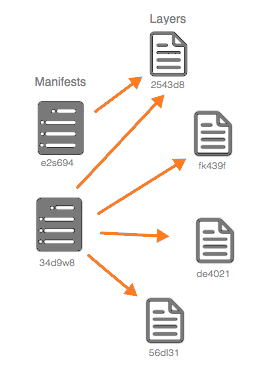
Manifests are a type of file that describe images. They reference a list of layers and hold metadata about the described image. Manifests can also share layers. Tags, which are labels applied to images, point to manifests. You can reference an image by tag or directly by the hash of the manifest. If you purposefully delete one of those manifests and the image layers referenced by that manifest become orphaned, then they can be removed during the garbage collection job. In the following diagram, both manifests point to the first layer, #2543d8.

Garbage collection illustration</soft-garbage/>

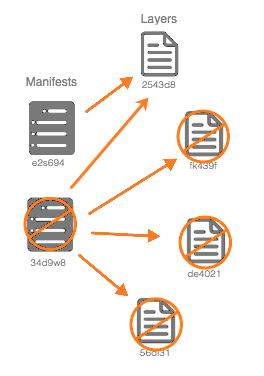
Since many developers may use a base image for future images, it is possible that there will be image layers that will never be deleted. There might be other manifests that point to layers of the base image which could still be used by others as seen in the second diagram.

Garbage collection illustration</soft-garbage/>

Prerequisites

You need an image to remove.

Soft delete an image

Developers may want to remove an image for several reasons. Examples include:

  • The image is outdated and there is a new version.
  • The image is no longer used.

If a developer removes the manifest of an image, then it is called a soft deletion. Developers won’t be able to access that image, although physically, it it still in the repository.

You can perform a soft deletion, either from the UI or from the command line.

From the Trusted Registry dashboard, navigate to Repositories > Tags. Click the trash can next to the images you want to remove. They are now marked for the garbage collection job.

Soft deletion of a tag in the UIn</soft-garbage/>

If you prefer to not use the UI, then you can open a Trusted Registry command line and type:

curl -u <username>:<password> -X DELETE https://<DTR HOST>/api/v0/repositories/<namespace>/<reponame>/manifests/<reference>

You can only delete one image at a time and you must also be authenticated as a user who has “write” level access to the repository.

Set up garbage collection

Trusted Registry administrators can optimize registry storage and free up space. They do this by setting up a recurring garbage collection job (cron job) where the system searches for any layers that are not referenced by any manifests and removes them. Administrators can perform this garbage collection process immediately, or more realistically, on a periodic automatic schedule. They perform garbage collection of unreferenced layers tags either through a Trusted Registry CLI or through the Trusted Registry UI.

If administrators choose to have the garbage collection process performed immediately, they can type in a Trusted Registry CLI:

curl -X POST -u <username>:<password> -H "Content-Type: application/json" "https://api/v0/admin/jobs" -d "{ \"job\" : \"registryGC\"}"

However, it is more common to set up the garbage collection cron job to be performed routinely as seen in the following example:

    curl -u <username>:<password> -H 'Content-Type: application/json' -X POST https://<DTR
    HOST>/api/v0/admin/settings/registry/garbageCollection/schedule -d '{"schedule":
    "<schedule>"}'

Trusted Registry administrators can also set the cron job through the Trusted Registry UI. Navigate to Settings > Garbage collection to schedule a job.

A cron job example

A Trusted Registry cron format has at most four fields representing hour, day, month, and day of week respectively. Moreover, administrators can use the following shortcuts: @yearly, @annually, @monthly, @weekly, @daily, @midnight, @hourly in either the UI or through the Trusted Registry CLI. If administrators choose to use the shortcuts, then only one can be used.

An example schedule of nightly at midnight would be: 0 * * *. Or alternately, for the same schedule, you could enter: @midnight. You can also enter less than four parameters if that’s all the job requires.

See the package cron page for other examples depending on your company’s requirements.

Note: The prior link displays examples using more than four fields. When Trusted Registry administrators set up a cron schedule, they are limited to only the four fields representing hour, day, month, and day of week.

Your downtime depends on the number of images and/or layers that are to be deleted. Docker recommends performing garbage collection weekly during off time. While garbage collection is occurring, anyone who tries to push an image will get an error message.

View your garbage collection results

See your results by running the following example in a Trusted Registry CLI:

curl -u <username>:<password> https://<DTR
HOST>/api/v0/admin/settings/registry/garbageCollection/lastSavings

The results are also displayed in the Trusted Registry UI by navigating to Settings > Garbage collection.

See also

  • See the administrator guide if you are an administrator responsible for running and maintaining Docker Trusted Registry.

  • See configuration to find out details about setting up and configuring Docker Trusted Registry for your particular environment.

Mar 5, 2016 at 1:15am (PST) { "docker/apidocs": { "ref": "master", "repos": [ "git@github.com:docker/dhe-deploy.git" ], "sha": "70ac255c88cde0ea6ecf3fcb812783dea7e09da6" }, "docker/cloud-api-docs": { "ref": "master", "repos": [ "git@github.com:docker/cloud-docs.git" ], "sha": "c0539949c40be9abb193271e46d2ea88196f122d" }, "docker/cloud-api-docs-layout": { "ref": "master", "repos": [ "git@github.com:docker/cloud-docs.git" ], "sha": "c0539949c40be9abb193271e46d2ea88196f122d" }, "docker/compose": { "ref": "docs", "repos": [ "git@github.com:docker/compose.git" ], "sha": "9da9555f10abe628e7742476af3f10bd89f68b75" }, "docker/docker": { "ref": "docs", "repos": [ "git@github.com:docker/docker.git" ], "sha": "0e63b073ac8f33335a4d4df3f2aa22120e0b7f43" }, "docker/docker-cloud": { "ref": "master", "repos": [ "git@github.com:docker/cloud-docs.git" ], "sha": "c0539949c40be9abb193271e46d2ea88196f122d" }, "docker/docker-hub": { "ref": "master", "repos": [ "git@github.com:docker/hub2-demo.git" ], "sha": "73ccb2d678ab0cd83067f0c7ef6f3923d750c7bd" }, "docker/docker-trusted-registry": { "ref": "master", "repos": [ "git@github.com:docker/dhe-deploy.git" ], "sha": "70ac255c88cde0ea6ecf3fcb812783dea7e09da6" }, "docker/docs-base": { "ref": "master", "repos": [ "git@github.com:docker/docs-base.git" ], "sha": "5a4cfac3c4d156eda45080c7dcdd2a4c41e08067" }, "docker/kitematic": { "ref": "docs", "repos": [ "git@github.com:docker/kitematic.git" ], "sha": "856a989d834f7fcbcb9bba687539fb159228f6b8" }, "docker/machine": { "ref": "docs", "repos": [ "git@github.com:docker/machine.git" ], "sha": "21edf30337dc5996b5d785ce54d68b4020242f57" }, "docker/notary": { "ref": "docs", "repos": [ "git@github.com:docker/notary.git" ], "sha": "dfeb51f54f2b0cdf20cb55427b7cc8ea2d1cdd0a" }, "docker/opensource": { "ref": "master", "repos": [ "git@github.com:docker/opensource.git" ], "sha": "b994cdd1f74b0aeb0b51fda1249a0c4c8efbf0d0" }, "docker/registry": { "ref": "docs", "repos": [ "git@github.com:docker/distribution.git" ], "sha": "a5bd3e61441873ba6cb40480bda58176733fedb9" }, "docker/swarm": { "ref": "docs", "repos": [ "git@github.com:docker/swarm.git" ], "sha": "b43a2c21c4017726cd9cb17ef9b16f2eef6d1159" }, "docker/toolbox": { "ref": "master", "repos": [ "git@github.com:docker/toolbox.git" ], "sha": "de267d701f94035549ea03e68047d85534286f85" }, "docker/tutorials": { "ref": "master", "repos": [ "git@github.com:docker/tutorials.git" ], "sha": "7af2622fe68a30684d971e4bf3ca7988902e5e26" }, "docker/ucp": { "ref": "docs", "repos": [ "git@github.com:docker/orca.git" ], "sha": "8cd10936a1e063b9be0d5c04de7311a1b2cb25cf" }, "docs.docker.com": { "ref": "refs/heads/v1.10-03-04-2016-165411", "repos": [ "git@github.com:moxiegirl/docs.docker.com.git", "git@github.com:docker/docs.docker.com.git" ], "sha": "5d156add0cb35c1b8f7d2dc1e08f04bd5725792b" } }