• Kiwi PyCon Winner

    A big congratulations goes out to Jonathon! He'll be traveling across the ditch to Wellington for a few handles, some Maori roast and of course Python.

    Thank you to all who submitted entries for our Kiwi PyCon Give-away. Don't worry, this won't be the last one we do. Watch the blog and twitter for other chances to win.

  • Linguist

    Inspector Linguist

    From time to time we get requests asking us to add support for new highlighting lexers, recognize additional extensions as certain languages, or ignore a directory from a repo's stats graph.

    The code for these concerns was scattered around the app. I decided to unify and package them all up into a single library. Now it's open source.

    So if you notice an unrecognized extension or you're really into some obscure language that isn't supported yet, now is your chance to help contribute back.

    https://github.com/github/linguist

  • Announcing GitHub for Mac

    Pull requests, merge button, fork queue, issues, pages, wiki –– all awesome features that make sharing easier. But those things are only great after you've pushed your code to GitHub.

    Today we're happy to announce GitHub for Mac.

    What does it look like?

    When you first launch GitHub for Mac, we'll help you set up your GitHub account and find repositories already on your computer. From there, you can start managing repositories.

    Once you dive into a repository, you'll be able to view the commit history just as you would on the web.

    And you can of course dive in to a specific commit to see the diff and perform some operations.

    Once you've made some changes, you'll be able to create commits.

    When you want to change branches quickly, press ⌘ + B and a branch selector will show up.

    Changing branches automatically stashes any changes until you switch back to the branch — switch branches with wild abandon. If you need to publish branches to GitHub, create a new branch, merge branches, or delete branches switch on over to the branches tab.

    Once you're ready to share your commits, or pull in remote commits — just press the Sync Branch button. We'll perform a smarter version of pull --rebase && push that reduces merge commits but doesn't rewrite your merges.

    Automatic updates

    Once you download GitHub for Mac, we'll send out updates and the app will automatically download them. Keep an eye out for a little upgrade notice with a list of changes.

    Behind the curtains

    GitHub for Mac wouldn't have been possible without some awesome open source projects:

    • libgit2 powers much of the Git operations for the app, making every interaction smooth, responsive and fast.

    • objective-git libgit2 bindings bridge the gap between Cocoa & libgit2.

    • Chameleon powers a good portion of the GUI. We're working with the Chameleon guys to get our changes into the main project, but in the mean time you can check out Josh's fork with all our modifications.

    Just the start

    This is just the beginning — we're really stoked for the future of GitHub for Mac and hope you will be too.

    GitHub for Mac 1.0 is free and available today
  • API v3: 190 methods to build on

    The entire v3 API is finally here! From commit comments to raw Git access and everything in between, this release wraps up the major development effort around the API. We will still spend a period of time in beta, addressing issues and taking feedback, so if there is something missing or broken please let us know!

    Some highlights of this release include:

    Some of this functionality doesn't even exist in v2 and some things (like turning an issue into a Pull Request) can only be done via the API. Along with all these updates, we have continued to improve our developer documentation. The goal is to let you access just about anything on GitHub via the API.

  • Kiwi PyCon Ticket Give-Away

    We have an extra ticket for Kiwi PyCon! The conference is in the lovely Wellington, NZ in late August. If you're interested in going, just fork this gist and answer a few questions. I'll take submissions through Sunday, June 26th.

    Besides the ticket, you'll also get one of our awesome T-shirts. I'll announce the winner next week.

    Watch the blog for more chances to win tickets to other confs in the future.

  • GitHub Services Get an Upgrade

    We deployed a big change to GitHub Services this week. The code is now clearer, more consistent, and better tested (thanks to Faraday). We also recently added support for Redmine, our 51st service.

    If you're a developer looking to improve one of the hooks, or add a new service, check out the Services README, as well as some existing hooks and tests.

  • Learning Is Sexy

    GitHub:Help

    As part of an ongoing mission to making it easier to learn how Git and GitHub works, we've revamped our documentation. Not only have we redesigned how GitHub:Help looks, we've also rethought how it is structured. The new system is built around the idea of “Hey, I want to learn something new today.” The new GitHub:Help serves not only as a location for troubleshooting, but also as a portal to new GitHub features and Git tricks.

    Whether it's learning how to create your first repo or how to remove accidentally committed sensitive data, the new GitHub:Help makes your learning both easy and more effective.

  • Repo Transfers

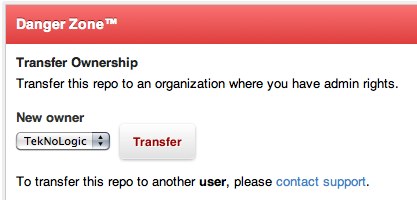
    We've just opened up access to a feature we've been brewing for some time now... transferring repos between accounts! While we've actually had this capability for a few months now, y'all had to contact support to request a repo move. Now you can do this yourself:

    There are a few caveats of course, there always are...

    • The target account must not have a repo with the same name, or a fork in the same network.
    • If the repo is private the target account must have a paid account with at least one unused private repo available.
    • Private forks cannot be transferred, only root private repos.

    We can't set up redirects, so every clone of the repo will need to have it's remote updated. Thankfully all you need to run is git remote set-url remote_name new_url to update your local repo.

    Update

    After much consideration and user feedback, we've decided to restrict this option a bit. You can now only transfer a repo into an organization account for which you have admin rights. This should cover the majority of cases, in the rare chance you want to transfer to another user please contact support.

  • New Users, Repos, and Orgs API

    Today we are rolling out some more API v3 functionality! Say hello to managing Users, Followers, Public Keys, Repositories, Forks, Collaborators, Watching, Organizations, Members and Teams via a clean, RESTful API. There is so much stuff in this new release!

    Along with this new API functionality we are also launching some updates to our developer documentation.

    Oh, and if you missed the first announcement, v3 also supports Issues 2.0 and Gists.

    Go build something amazing on top of GitHub!

  • Online Git Training next Monday

    It is that time once again! Next Monday, June 13, GitHub is hosting another online Git training course conducted by our friend Matthew McCullough of Ambient Ideas. If you or your teammates need to get up to speed on Git quickly and from the comfort of your home or office, this course is just the ticket.

    Matt will do six 50 minutes sessions during which you'll explore the foundations of Git through the practical every-day commands. The course runs from 11:00 am to 6:00 pm EST and costs $195 for one student or you can get three students in for $435.

    You can learn more about the course and sign up here.

    Past classes have been great. Here are some things our students have had to say about it:

    "Thank you very much for your Git class! It was excellent, very clear, great examples, very professional. I am a lot more comfortable with Git now."
    -Oscar Pagani, Front End Web Developer, Wells Fargo Bank


    "Online git training today was phenomenal. Highly recommended."
    -David Bock, Founder, Code Sherpas


    "Wow - finally seeing the full power of rebase - loving the #git training from Matthew McCullough."
    -Peter Bell, CTO of SystemsForge


    "I feel you were a great instructor. The presentation, your control, and the overall presentation were great. I feel that class had enough freedom to explore different things, but was still grounded with a plan of attack. Very easy to listen for 6 hours today; can't say that with every instructor. Overall I would give this course and you very high marks."
    -Ryan Gibbons, Senior Developer at Warren Douglas
  • Scheduled Maintenance Tomorrow @ 20:00 PST

    The site will be down for maintenance tomorrow night (Wednesday, June 8, 2011) at 20:00 PST. We'll be restarting a couple redis servers to increase limits. Total downtime shouldn't exceed 10 minutes. All site and git access will be unavailable during the window.

    UPDATE: The maintenance was successful. Thanks!

  • GitHub Drinkup SF #27

    It's almost the second Thursday of the month, you know what that means... another drinkup. All of you visiting for WWDC should come and experience a drinkup on our home turf. This month we're going to The Lookout in the Castro. Come out and have a beer on us.

    The Facts:

    The Lookout 3600 16th Street Thusday, June 9th 2011 8:00pm

  • Matt Todd is a GitHubber

    Today is Matt Todd's first day at GitHub. After some initial confusion that we were hiring a New Zealand Rugby Union footballer, this Matt Todd is an acclaimed Rubyist and prolific open source developer. He'll be helping us with the ever-growing GitHub:FI product.

    You can keep track of what he's up to at GitHub, Twitter, and Tumblr.

    Welcome Matt!

  • Who is GitHub, anyway?

    The statute of limitations have finally expired for a few nefarious deeds committed by GitHub employees, so our crack team of lawyers admitted we could finally build a long-overdue shiny About GitHub page.

    About GitHub!

    If you ever wanted to know who's on the team, grab a quick GitHub logo, or find out how many beers we have on tap at the office, check us out! Feel free to fling our Octocat around outer space while you're there.

  • Kami Lott is a GitHubber

    I'm proud to announce that Kami Lott has joined our team!

    Kami will be serving as our first ever Community Manager. That means she'll be organizing meetups, coordinating sponsorships, scheming up programming contests, writing case studies about our awesome customers (you!), and responding to your great feedback on Twitter and through our support channels.

    Since you're all part of the GitHub community, make sure to follow her on GitHub and Twitter. She's here to help make your experience with GitHub a great one.

    Welcome aboard, Kami!

Markdown Cheat Sheet

Format Text

Headers

# This is an <h1> tag
## This is an <h2> tag
###### This is an <h6> tag

Text styles

*This text will be italic*
_This will also be italic_
**This text will be bold**
__This will also be bold__

*You **can** combine them*

Lists

Unordered

* Item 1
* Item 2
  * Item 2a
  * Item 2b

Ordered

1. Item 1
2. Item 2
3. Item 3
   * Item 3a
   * Item 3b

Miscellaneous

Images

![GitHub Logo](/images/logo.png)
Format: ![Alt Text](url)

Links

http://github.com - automatic!
[GitHub](http://github.com)

Blockquotes

As Kanye West said:
> We're living the future so
> the present is our past.

Code Examples in Markdown

Syntax highlighting with GFM

```javascript
function fancyAlert(arg) {
  if(arg) {
    $.facebox({div:'#foo'})
  }
}
```

Or, indent your code 4 spaces

Here is a Python code example
without syntax highlighting:

    def foo:
      if not bar:
        return true

Inline code for comments

I think you should use an
`<addr>` element here instead.