First Java Program
Welcome to your first Java program! In this lesson, you'll write the
classic "Hello, World!" program and learn the fundamental structure of a Java
application. You'll understand how to compile and execute Java code, and get
familiar with the main method - the entry point of every Java
application.
Hello, World!
The traditional first program in any programming language is "Hello, World!" - a simple program that displays text. In Java, even this simple program requires understanding a few key concepts.
Click Run to execute your code
- A
classdeclaration (Java is object-oriented) - A
mainmethod (entry point for execution) - Code statements inside the method
Understanding the Structure
Let's break down the Hello World program line by line:
Click Run to execute your code
Line-by-Line Explanation
| Line | Explanation |
|---|---|
public class HelloWorld |
Declares a public class named HelloWorld. The class
name must match the filename (HelloWorld.java) |
{ |
Opening brace starts the class body |
public static void main(String[] args) |
The main method - entry point. public
makes it accessible, static allows calling without
creating an object, void means it returns nothing |
System.out.println("Hello, World!"); |
Prints "Hello, World!" to the console and moves to a new line |
} |
Closing braces end the method and class |
The main Method
The main method is special in Java - it's the entry point where
program execution begins. The JVM looks for this exact method signature to start
running your program.
public static void main(String[] args)public- Accessible from anywhere (required by JVM)static- Can be called without creating a class instancevoid- Doesn't return any valuemain- Method name (must be exactly "main")String[] args- Command-line arguments (array of strings)
main method signature is fixed.
Changing any part of it (like removing static or changing the
parameter type) will prevent your program from running!
System.out.println
System.out.println is used to display output on the console. Let's
understand each part:
System- A built-in class in Javaout- A static member of System class (represents standard output stream)println- Method that prints the argument and adds a newline
println vs print
Java provides two methods for output:
Click Run to execute your code
| Method | Behavior | Example |
|---|---|---|
System.out.print() |
Prints without newline | System.out.print("Hello"); System.out.print("World"); →
"HelloWorld" |
System.out.println() |
Prints with newline | System.out.println("Hello"); System.out.println("World");
→ "Hello\nWorld" |
Compilation and Execution
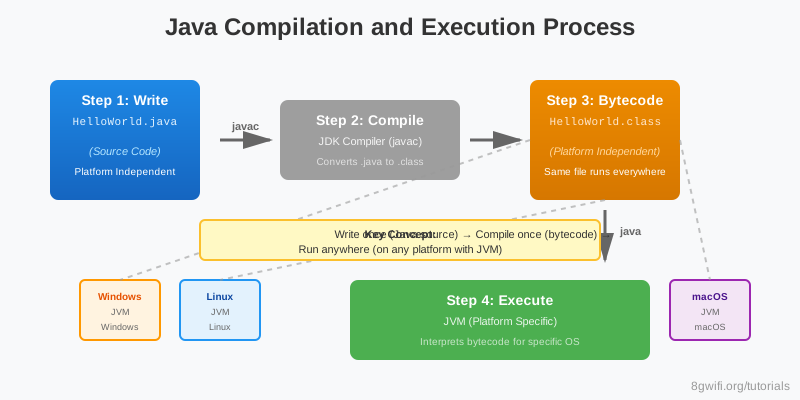
Java programs require a two-step process: compilation and execution.
Step 1: Compile
Use the javac command to compile your Java source file:
javac HelloWorld.javaThis creates a HelloWorld.class file containing bytecode.
Step 2: Execute
Use the java command to run the compiled program:
java HelloWorldNote: Don't include the .class extension when
running!
Class Name Must Match Filename
In Java, the public class name must exactly match the filename (without the
.java extension). This is a Java requirement.
| Filename | Class Name | Valid? |
|---|---|---|
HelloWorld.java |
public class HelloWorld |
✓ Yes |
HelloWorld.java |
public class Hello |
✗ No - Compile error |
hello.java |
public class HelloWorld |
✗ No - Compile error |
HelloWorld, helloworld, and HELLOWORLD
are all different. The class name and filename must match exactly, including
case.
Common Mistakes
1. Missing main method
public class HelloWorld {
    // Missing main method!
    System.out.println("Hello");
}
Error:
Error: Main method not found in class HelloWorld
Solution: Every program needs a main method
2. Wrong main method signature
// Wrong - missing static
public void main(String[] args) { ... }

// Wrong - wrong return type
public static int main(String[] args) { ... }

// Correct
public static void main(String[] args) { ... }
3. Class name doesn't match filename
// File: HelloWorld.java
public class Hello {  // Error! Class name must be HelloWorld
    ...
}
Error:
class Hello is public, should be declared in a file named Hello.java
4. Missing semicolon
// Wrong
System.out.println("Hello")

// Correct
System.out.println("Hello");
Error: ';' expected
5. Missing quotes around strings
// Wrong
System.out.println(Hello World);

// Correct
System.out.println("Hello World");
Error: cannot find symbol: variable Hello
Exercise: Personalize Your Program
Task: Modify the Hello World program to introduce yourself!
Requirements:
- Print your name
- Print your favorite programming language
- Print a greeting message
- Use both
printandprintlnmethods
Click Run to execute your code
💡 Hint
Try using multiple System.out.println() statements, or use
System.out.print() for the name and
System.out.println() for the language.
Summary
- Every Java program must have a
public classwith a matching filename - The
mainmethod is the entry point:public static void main(String[] args) System.out.println()prints output with a newline;System.out.print()prints without a newline- Compile with
javac filename.javato create a.classfile - Execute with
java ClassName(no.classextension) - Java is case-sensitive - class names and filenames must match exactly
- Statements must end with a semicolon (
;)
What's Next?
Congratulations! You've written your first Java program. Now that you understand the basic structure, let's learn about Java syntax - statements, blocks, comments, and naming conventions. These fundamentals will help you write clean, readable Java code.
Enjoying these tutorials?