채널
받은 편지함에 있는 대화를 모두가 볼 수 있는 곳으로 가져오세요.
채널은 협업을 위한 유연하고 투명한 공간입니다. 프로젝트 논의, 파일 공유, 프로세스 자동화까지 채널에서 이 모든 작업을 처리할 수 있고 원하는 만큼 많은 작업들을 생성할 수 있습니다.
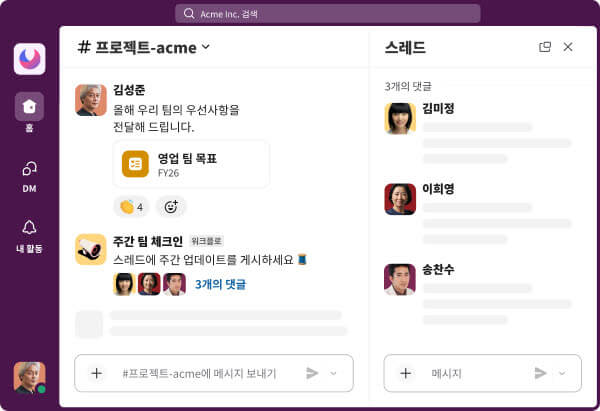
채널은 올바른 인력과 정보를 한곳에 모아 줍니다. 어떤 주제든 최신 정보를 제공하고 집단 지식을 공유하고 AI의 도움을 받아 작업을 처리하세요.
코드 채널은 여러분과 팀원, AI 에이전트가 열린 환경에서 함께 작업할 수 있도록 한데 모아 줍니다. 에이전트를 멘션하기만 하면 채널을 만들고 팀원들을 참여시킨 다음, 작업이 완성되어 가는 과정을 지켜볼 수 있습니다.
채널은 협업을 위한 유연하고 투명한 공간입니다. 프로젝트 논의, 파일 공유, 프로세스 자동화까지 채널에서 이 모든 작업을 처리할 수 있고 원하는 만큼 많은 작업들을 생성할 수 있습니다.
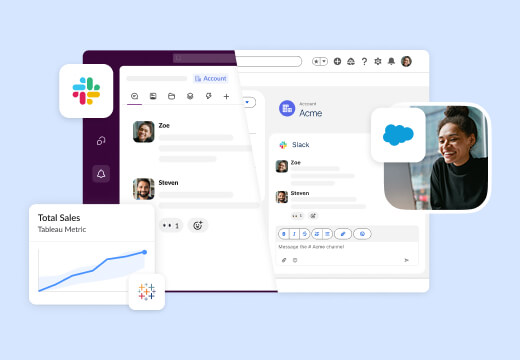
Salesforce 채널은 Salesforce를 Slack으로, Slack을 Salesforce로 가져옵니다. 실시간 업데이트를 받고, 기회에 대한 전략을 세우고, 레코드를 편집하는 등 모든 작업을 Salesforce와 Slack 모두의 협업 채널에서 수행할 수 있습니다.
Slack의 AI는 업무가 이루어지는 채널과 스레드에서 바로 사용할 수 있습니다. 전체 채널에 대한 한눈에 정리를 매일 받고, 지능형 요약으로 정보를 파악하고, 가장 중요한 프로젝트에 더 많은 시간을 할애하세요.
Slack Connect 채널을 사용하면 마치 자신의 팀과 함께 일하는 것처럼 가장 중요한 고객, 파트너, 대행사와도 긴밀하고 안전하게 협업할 수 있습니다.
10명의 팀이든 10,000명으로 구성된 팀이든 채널에서 더 빠르게 업무를 진행할 수 있습니다.
모든 정보는 엔터프라이즈급 보안 및 산업 규제를 준수하여 암호화됩니다.
집단 지식을 구축하고 조직 내부 지식을 유지하고 AI 기반 검색으로 이를 활용하세요.
집중하는 데 시간이 걸리나요? 한눈에 정리와 요약으로 놓친 대화를 빠르게 파악할 수 있습니다.
DMs are just between you and one or more recipients. Think of it as a private conversation people might have in a small room.
With channels, you can assemble the right people in one space and organize around a common goal. Channels can be made public or private, and any member who’s added to a channel can easily read up on the past messages they need to get up to speed. It’s easy to join and leave channels, and you can always find them again in your sidebar or using search.
You can invite someone outside of your company to share a channel in Slack using their email address. Your admins may need to approve invitations you send. Depending on each company’s Slack settings, people may also need admin approval to accept your invitation.
It takes only a few clicks to start working closely with vendors, customers, and more. Our sales team is happy to help you get started.
Salesforce channels give teams a dedicated space to work together to support a specific customer, deal, or any other topic tracked in Salesforce. Salesforce channels include important customer data and CRM quick actions while connecting the team conversation back to customer data, offering more value and convenience than a standard channel.
To learn how to set up Salesforce channels for your organization, visit the Slack help center.
AI talks to you in the language you set in your individual language preferences. If you would like AI to respond to you in another language, adjust your Slack language preferences. AI can also translate messages in Slack to the translation language you set.
When you initiate a summary, recap, or search, AI in Slack sends only the most relevant messages to the LLM to create a summary. To do this, Slack messages get filtered through different language-specific models to find and rank highly relevant information. When we say a language is supported, it means that language has its own filtering models, and we’ve done quality testing on the results.
Currently, languages supported include Chinese (Simplified or Traditional), English, French, German, Japanese, Korean, Portuguese, and Spanish. If you use Slack in a language not available in your preferences, AI in Slack will still return results, but you may see a difference in quality.
세션 채널은 사람과 에이전트가 협업할 수 있도록 특별히 설계된 채널입니다. 에이전트가 채널을 만들고 그 안에서 작업한 다음, 결과물을 원래 채널의 콘텍스트에 맞게 공유합니다. 작업이 완료되면 채널은 보관되지만, 대화와 아티팩트, 콘텍스트는 그대로 유지되어 필요한 사람이 언제든 검색할 수 있습니다.