Get ready for Orgy in 15 minutes
Orgy is a static website generator for Org files.
It turns a directory of .org files into a website with navigation, section indexes, tag pages, RSS feeds, multilingual layouts and themes, without requiring any configuration or templates. You write Org files, run a single orgy command, and get a public/ directory ready to deploy.
This tutorial will guide you through creating a decent static website from an empty directory in a few steps.
We assume that Orgy is already installed and available as the orgy command.
Step 1 - Your first page
Create a directory and a single index.org file:
mkdir website
cd website
#+title: Hello
Welcome to my site.Serve it:
orgy serveYou're done! You can see the website at http://localhost:1888.
No config, no templates, no theme.
See the new public/ directory:
website/
├── index.org
└── public/
    └── index.html

Step 2 - Add a blog post
Drop a second .org file right next to index.org:
#+title: Hello World
#+date: 2026-04-10

This is my first *post* with some /Org markup/ and a [[https://orgmode.org][link]].
Save it as hello-world.org.
orgy serve will notice the modification and rebuild the site for you.
website/
├── hello-world.org
├── index.org
└── public/
    ├── hello-world/
    │   └── index.html
    ├── index.html
    └── ...
The URL slug comes from the filename. The title and date come from the headers. The page automatically appears in the top navigation.
Step 3 - Configure your site
So far orgy used your directory name as the site title. Create a config.edn file at the root of website/:
{:title     "My Notebook"
 :base-url  "https://example.com"
 :copyright "© 2026 Me - CC BY-SA 4.0"
 :menu      ["hello-world"]}
The header now shows your custom title, the footer shows your copyright, and the navigation is limited to what you listed in :menu. Every key in config.edn is optional - add only what you need.
Step 4 - Organize with sections
Any subdirectory becomes a section with its own index. Let's group posts under notes/:
mkdir notes
mv hello-world.org notes/
Add a second post notes/second-post.org:
#+title: Second Post
#+date: 2026-04-11

Another entry.
Update the menu in config.edn:
:menu ["notes"]After orgy serve has rebuilt the website, you have this:
website/
├── config.edn
├── index.org
├── notes/
│   ├── hello-world.org
│   └── second-post.org
└── public/
    ├── index.html
    └── notes/
        ├── index.html          <= auto-generated section index
        ├── hello-world/
        │   └── index.html
        └── second-post/
            └── index.html
You never wrote a listing page, orgy generated notes/index.html for you!
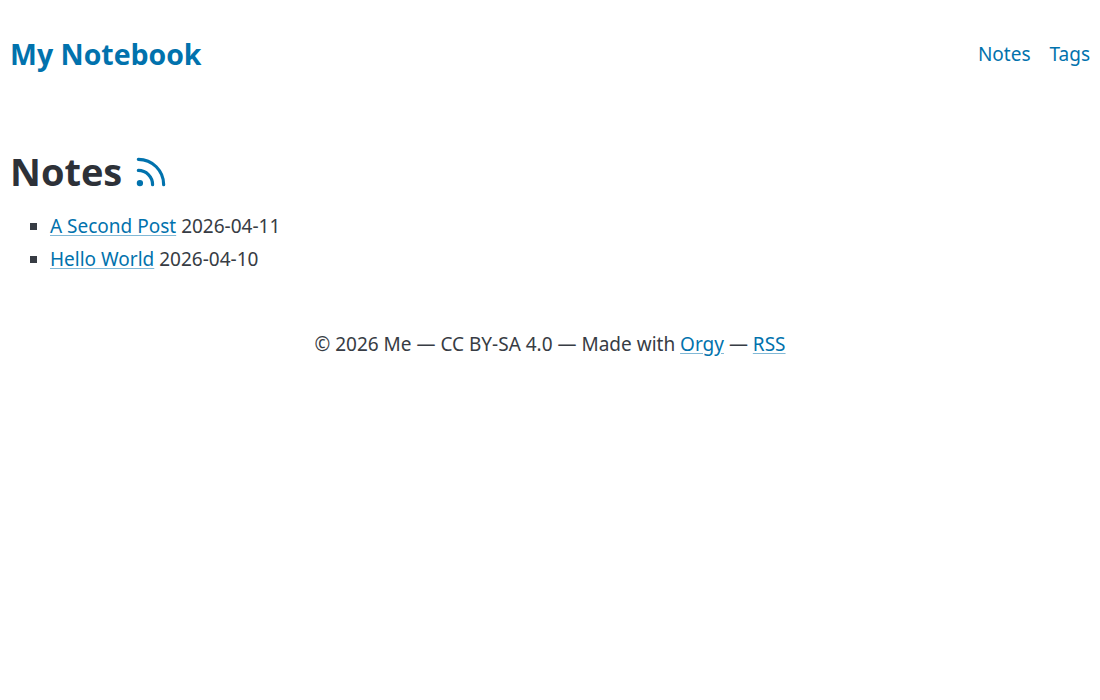
Step 5 - Use tags
Add a #+tags: line to any post:
#+title: Hello World
#+date: 2026-04-10
#+tags: emacs org-mode
Orgy creates:
public/tags/
├── index.html          ← all tags with post counts
├── emacs/index.html    ← posts tagged "emacs"
└── org-mode/index.html
A "Tags" link is automatically appended to the navigation.

Step 6 - Go multilingual
Want a French version of a post? Just rename the file with a language suffix:
mv notes/hello-world.org notes/hello-world.en.orgAnd write the translation in notes/hello-world.fr.org:
#+title: Bonjour le monde
#+date: 2026-04-10

Mon premier /billet/.
Orgy detects multilingual mode and switches the output layout:
public/
├── index.html          ← redirects to first language
├── en/
│   ├── index.html
│   ├── feed.xml
│   └── notes/...
└── fr/
    ├── index.html
    ├── feed.xml
    └── notes/...
Each language gets its own homepage, section indexes, tag pages, and RSS feed. A language switcher appears in the nav. The only thing you changed is a filename.
Step 7 - Images and captions
Drop an image anywhere in your content tree, for instance next to the post that uses it:
notes/
├── hello-world.en.org
└── photo.jpg
Orgy copies every non-org file to the output, preserving the path
notes/photo.jpgends up atpublic/notes/photo.jpg. Nostatic/folder, no manual copying, no asset pipeline. Reference it from the post with a plain relative link:
[[./photo.jpg]]To turn it into a proper <figure> with a caption, add #+caption: above the image:
#+caption: A nice view from the office window
[[./photo.jpg]]
And if you want alignment, add #+attr_html: too:
#+caption: A nice view from the office window
#+attr_html: :align right
[[./photo.jpg]]
For site-wide assets (favicon, custom CSS, shared images), use a static/ directory at the root - its contents are copied verbatim to public/.
Step 8 - Math formulas
Orgy renders LaTeX math out of the box. Write inline math between dollar signs and display equations between \[ and \]. See this example, followed by how it is rendered:
Euler's identity $e^{i\pi} + 1 = 0$ is often called the most
beautiful equation in mathematics.

The Gaussian integral:

\[
\int_{-\infty}^{+\infty} e^{-x^2}\,dx = \sqrt{\pi}
\]
Euler's identity \(e^{i\pi} + 1 = 0\) is often called the most beautiful equation in mathematics.
The Gaussian integral:
\[ \int_{-\infty}^{+\infty} e^{-x^2}\,dx = \sqrt{\pi} \]
No extra configuration is needed. Orgy loads MathJax on any page that contains math, and skips it on pages that don't.
Step 9 - Add a theme
The finishing touch. Add a :theme key to config.edn:
{:title     "My Notebook"
 :base-url  "https://example.com"
 :copyright "© 2026 Me - CC BY-SA 4.0"
 :menu      ["notes"]
 :theme     "teletype"}
Reload - your site now has a full theme loaded from the pico-themes CDN. Try other names like swh, org, lincolk, ashes or doric. You can also point :theme to an https:// URL or a local .css file.

Going further
You now have a real multilingual blog with tags, images, RSS feeds, a sitemap, and a theme - built from plain Org files and a few lines of config. A few things to explore next:
orgy init- bootstrapconfig.ednand the full set oftemplates/for customization#+draft: true- exclude a file from the build:quick-search true- enable client-side search:theme-toggle true- add a light/dark switch in the navorgy help- list all CLI options
Orgy's philosophy: simple things should be simple, complex things should be possible. You just saw the simple half 😀
Enjoy!
👉 More code contributions.