Logging and stdout
To help with debugging your code, Pluto supports showing messages printed with the standard library Logging module. This can be done using the @info, @warn and @error macro.
For example, you can use @info somewhere in your code to see the value of a variable while your code runs:
begin
	result = 0

	for i in 1:5
		x = i^2
		@info("Current value", x)
		result += x
	end
	result
end

You can give @info as many arguments as you want. The first argument is a message, and the other arguments are key-value pairs that will be shown in the logs. For example, we can add i to the log.

Log levels: @debug, @info, @warn, @error
Each log message can have a level or severity. This makes it easy to distinguish between different types of log messages. To change the log level, you can use the corresponding macro: @debug, @warn or @error instead of @info.

@debug is useful when sharing your work as a package. @debug logs will only display in your notebook, but not when someone else imports your code/package.
Special log arguments
Pluto will use its rich object inspector to display the arguments of log messages. This means that you can log complex objects like Dicts, DataFrames, or even plots, and they will be displayed in a nice way in the logs.
Here is an example of logging a Vector, and an Exception:

Hiding logs for a cell
If a package logs warnings or info messages that you want to hide (especially in the static export of the notebook), then the option to hide logs can be toggled by clicking on the cell menu (the three dots on the right).
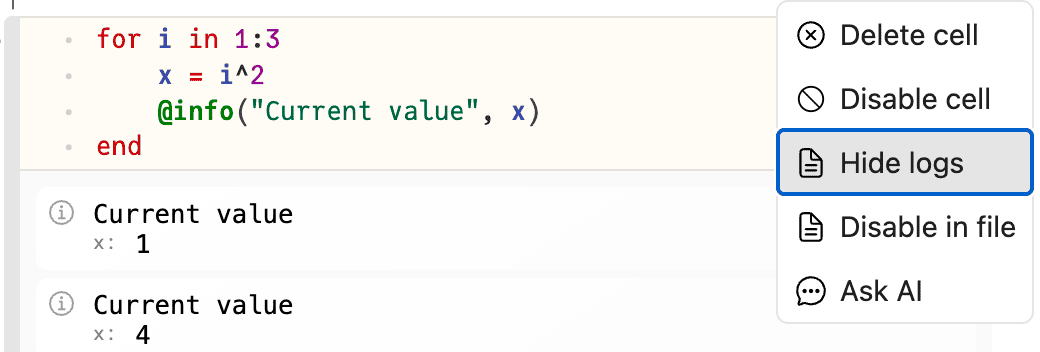
To filter logs more specifically, you can use a package like LoggingExtras.jl.
Logging progress
Pluto supports an integration with the ProgressLogging.jl package which can be used to display a progress bar in the log message area:

Writing to standard output
You can also use Julia functions like println, display, @show or show, which will write information to the standard output stream. This is the “old” way of logging information, but it is still supported in Pluto in case you need it.

Use Logging instead of stdout!
We recommend using Logging instead of println. There are many advantages of using Logging instead of writing to standard output:
- Logging works when writing multi-threaded code.
printlnwill mix different threads’ output together, making it unreadable. - Logging allows for more structured information. For example, you can log a
Dictand inspect it in Pluto. You can even logplot(data)and see the plot! - Logging can be easily filtered/disabled by the caller of a function. This is useful when writing packages. It can improve the experience and performance of your package.
Disable capturing of standard output
By default, Pluto captures the standard output stream and shows it in the notebook. To disable this, and show it inside the terminal instead, the capture_stdout=false option can be provided to Pluto.run when launching Pluto. Learn more about configuring Pluto.